How to Scrape Market Research Data with AI (No Code) 2026

Introduction
Market researchers spend too much time copying and pasting data from web pages into spreadsheets. That slows down insight cycles and increases errors. This guide shows how to collect clean, repeatable web datasets using a no code, human-in-the-loop approach with the AI Web Scraper Chrome extension. You will learn how to select representative pages, train an extractor to capture the exact fields you need, run on demand extractions, and export tidy CSV or JSON files that feed analysis and BI workflows.
If you want a hands-on tool to capture web data without writing selectors or scripts, try the AI Web Scraper Chrome extension. This article focuses on practical steps researchers can follow to create reproducible datasets and maintain extractor quality as pages change.
The problem with web data for research
Web data is valuable but messy. Pages for the same product or topic can vary significantly between regions, devices, or even A B tests. Review formats differ, price labels include promotions, and bundles or multipacks change the product name and unit price. If you rely on naive copy and paste or a brittle selector, your dataset will be inconsistent and hard to analyze.
Researchers also face data quality issues like inconsistent currency formats, missing timestamps for reviews, and duplicated listings across sellers or marketplaces. Before extracting data at scale, you need a plan that accounts for page variation and the fields required for your analysis.
Common Data Quality Issues:
- Inconsistent formatting: Prices shown as "$19.99", "USD 19.99", or "19.99"
- Missing fields: Some products lack ratings, review counts, or availability info
- Regional variations: Different layouts for US vs EU product pages
- Dynamic content: Reviews loaded via JavaScript that may not appear in static extracts
A human-in-the-loop, on-demand approach
Instead of fully automated pipelines, use a human-in-the-loop workflow where researchers train extractors for representative page types and run extractions on demand. This approach gives you control over data quality and lets you adapt quickly when pages change. The core steps are simple: select a sample page, train the AI extractor visually, run extraction on demand, then export and clean the data for analysis.
The workflow keeps the researcher involved in validation and makes datasets reproducible by saving extractor versions and training samples. It is an ideal fit for market research teams that need high quality data but do not want to manage complex scraping infrastructure.
Why This Approach Works:
- ✓ Quality control: Researchers validate data before it enters analysis
- ✓ Flexibility: Adapt extractors when websites change
- ✓ Reproducibility: Documented steps and saved configurations
- ✓ No infrastructure: No servers or code to maintain
How to set up market research scraping
Step 1: Prepare and plan
Start by defining your research questions and the exact fields you need. For product studies this might include product name, brand, price, list price, availability, seller name, rating, number of reviews, and review timestamps. For market trend work you may need publication dates, author, headline, and tags. Create a sampling plan with 10 to 30 representative pages that capture layout variation across regions, mobile and desktop views, and different seller or content types.
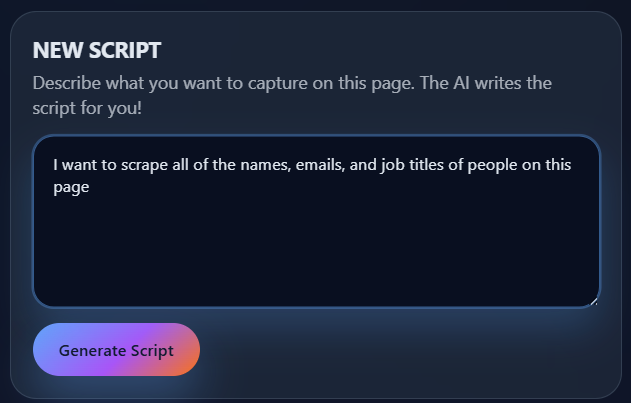
Step 2: Select a page and inspect content
Open a representative page in Chrome and load the AI Web Scraper extension. Identify the primary fields you need to capture. Common fields for market research include price, list price, discount labels, rating, review count, product identifier, and seller. If a page uses lazy load or infinite scroll, scroll manually to ensure content is loaded before you select fields.
Choose pages that expose the variations you anticipate. For example, include product detail pages, search results, category pages, and seller storefronts if your research looks at multi-seller marketplaces.
Step 3: Train the AI extractor
Use the extension's visual training tools to teach the extractor how to find each field. Click the first instance of a target field on the page and confirm similar items when the tool highlights matching elements. Add alternate examples from other sample pages to improve generalization. Train fields like price to include the currency symbol or to capture both the numeric value and a separate currency field if you will analyze mixed currencies.
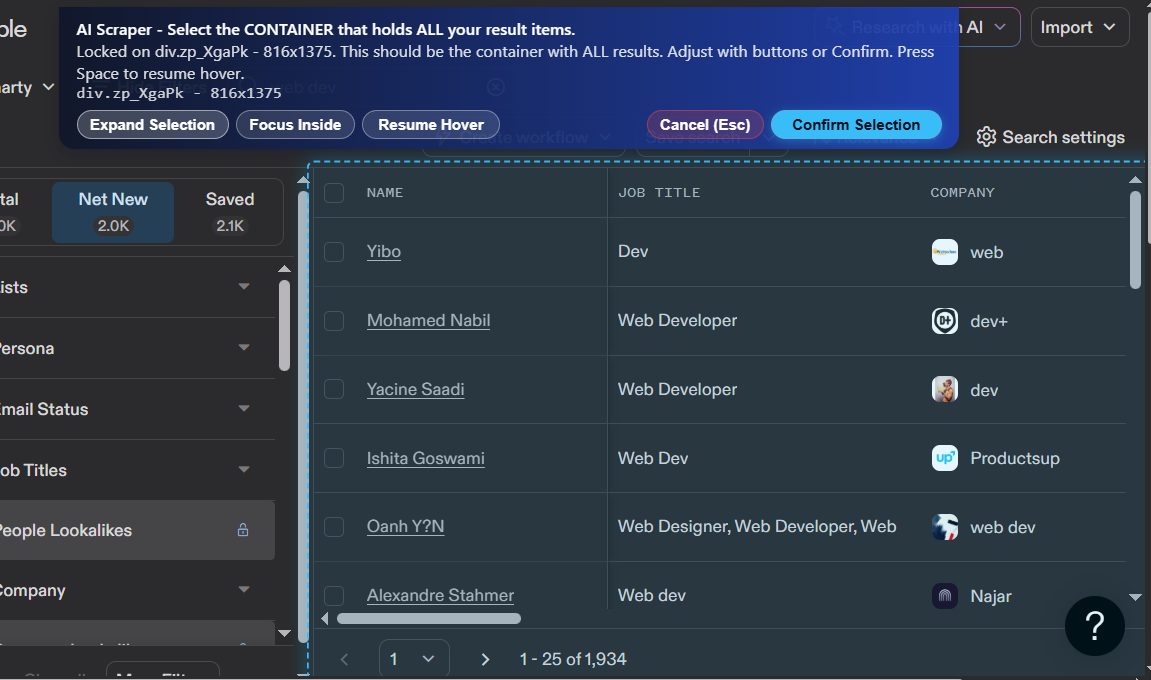
For complex fields like seller attribution or buy box owner capture the visible seller name text and any seller id attributes available in the page markup. For review timestamps capture the ISO date if present or the raw date text and normalize it during post-processing.
Step 4: Run extraction on demand
After training, run the extractor on your sample pages. The extension provides a preview of extracted rows. Use that preview to spot-check for missing or misaligned values. Because AI Web Scraper focuses on on demand extraction, you will re-run the extractor manually whenever you need updated data or when a page layout changes.
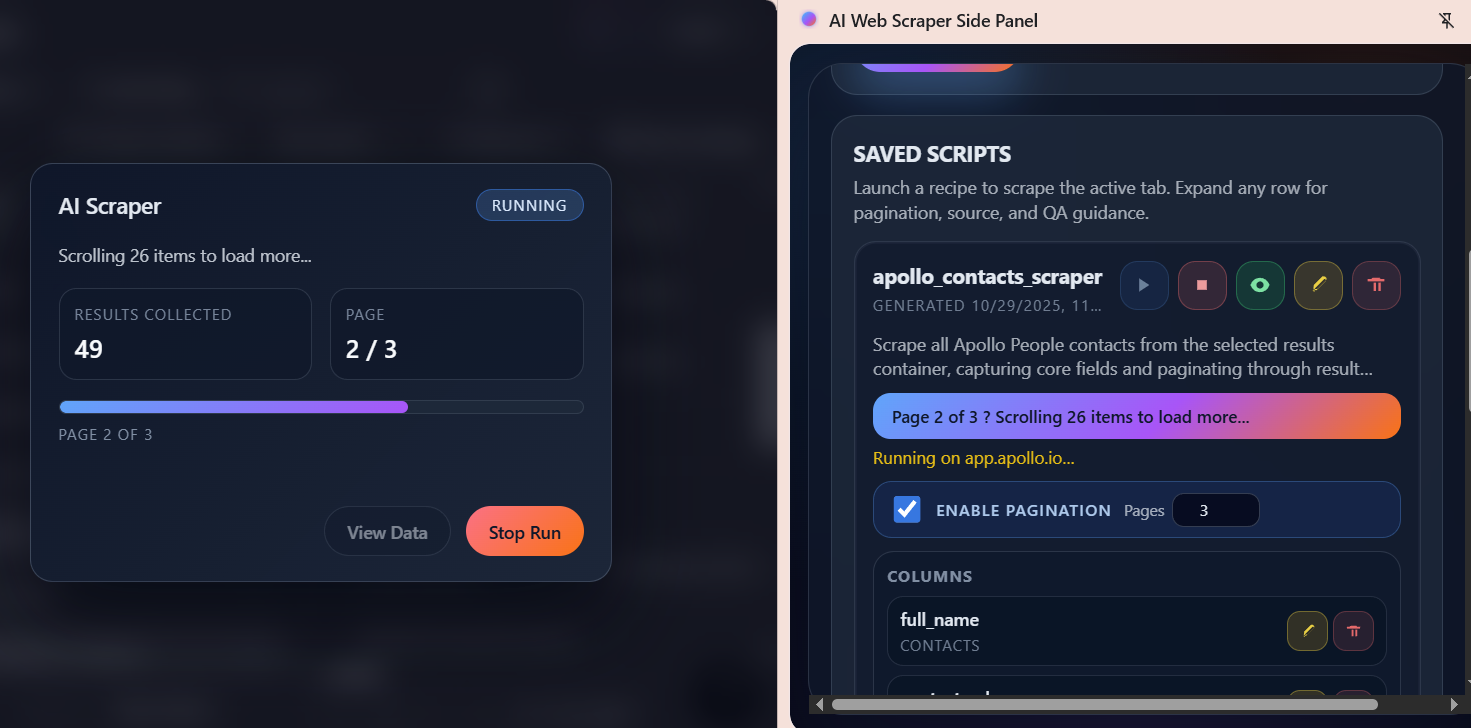
Best validation steps include sampling 20 to 50 rows from the extraction result and comparing key fields to the live page. Check for truncated text, incorrect price parsing, and missing seller information. Keep a small golden dataset of validated rows to compare future runs and detect drift.
Step 5: Export and post-processing
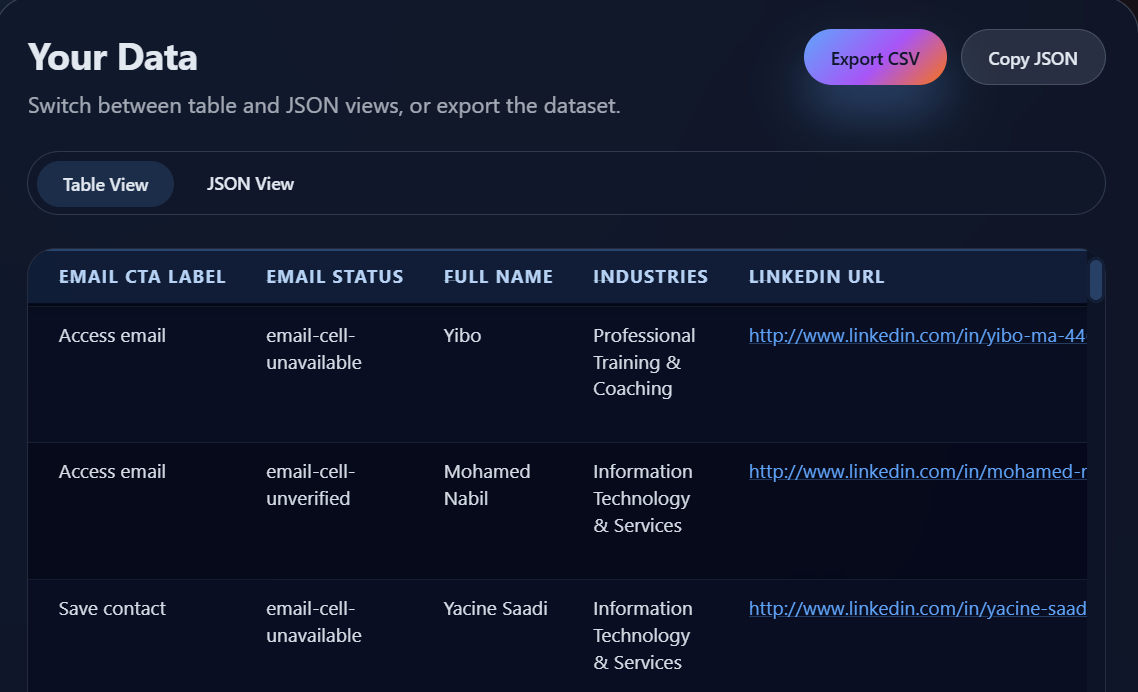
Export the extraction as CSV for spreadsheet analysis or JSON for analytics pipelines. After export perform these common cleaning steps:
Post-Processing Checklist:
- Currency normalization: Convert all prices to a single currency and include the original currency column for traceability.
- Numeric parsing: Strip non-numeric characters and convert price and review counts to numbers.
- Date standardization: Convert date strings to ISO 8601 format for analysis.
- Deduplication: Identify duplicate product rows using a product id or normalized product name.
- Promotion parsing: Extract promotion labels and normalize them into a categorical field like sale, coupon, or bundle.
Store the exported files with a naming convention that includes the extractor name and timestamp. This makes it easy to track datasets over time and reproduce results for an analysis or audit.
Step 6: Validation and versioning
Save example pages and the extractor configuration used during training. When you update the extractor retrain it on newly observed page variants and re-run your validation samples. Maintain a changelog that records when extractors were updated and which sample pages were used for validation.
Best practices
Follow these practical tips to keep data reliable and reproducible.
- Representative sampling: Train using a small but diverse set of pages so the extractor learns common variants.
- Human validation: Always review a sample of rows after training or after a significant page change.
- Respect site policies: If the data is behind a paywall or restricted, contact the site owner or use a published API when available.
- Keep a golden dataset: Maintain a validated dataset for regression testing extractor output.
- Document fields clearly: Store a data dictionary that explains each exported column and any cleaning applied.
For pages with frequent layout changes prefer shorter manual refresh cycles driven by the research calendar. For sensitive or high volume work consider combining manual extraction with a professional data provider or API.
Use cases
Market research teams use on-demand web extraction for several common tasks.
- Competitor landscape: Collect product features, prices, and review sentiment across competing products to map strengths and weaknesses.
- Trend tracking: Capture product launches, price changes, and review volume to detect market shifts. Use manual refreshes aligned to research milestones.
- Academic studies: Build reproducible datasets for sampling and statistical analysis where data provenance matters.
- Brand monitoring: Detect unauthorized sellers or policy violations by scraping seller storefronts and product listings.
For additional reading on web scraping fundamentals see our AI web scraping guide which covers core concepts and sample workflows.
Frequently Asked Questions
Is scraping market data legal?
Legal issues depend on the site and the data. Publicly available data is often safe to collect for research, but scraping restricted content or circumventing access controls can be legally risky. When in doubt consult legal counsel or request permission from the site owner.
How often should I manually refresh data for trend analysis?
Frequency depends on the research question. For long term trends weekly or monthly snapshots are common. For fast moving product categories you may re-run extractions before each analysis milestone or after identifying a market event.
How do I handle pages that change layout often?
Keep a small set of sample pages that capture recent variants and retrain the extractor when mismatches appear. Use a golden dataset for regression tests and document extractor changes in a changelog.
What export format should I choose for BI tools?
Use CSV for spreadsheet work and quick analysis. Use JSON when you plan to feed data into pipelines or store nested structures like review objects. Always include a timestamp and source URL column for provenance.
Can I capture review metadata like reviewer location or timestamps?
Yes when the page exposes that data. Capture raw fields and normalize timestamps during post-processing. If a field is not visible consider whether it is available via an API or by partnering with the data owner.
How do I keep datasets reproducible?
Save extractor versions, sample pages, and export snapshots with timestamps. A simple naming convention and a changelog go a long way to keeping datasets reproducible for future audits or replication.
Next steps
Ready to collect cleaner market research data without writing code? Install the AI Web Scraper Chrome extension and start training extractors on your sample pages. Visit AI Web Scraper to learn more and download the extension.
With a no code, human-in-the-loop approach, you can build reproducible datasets that power your research without the overhead of complex scraping infrastructure. Start with a few sample pages, validate your extractor, and scale your data collection as your research needs grow.